.png?width=300&height=50&name=SAGA_logo_White_RGB%20(1).png)
The sensor inside your cuffs that detects limb occlusion pressure (LOP) is sensitive and may occasionally require a reset to function correctly. Please note these are steps for AirBands V1 cuffs, if you have AirBands 2.0 cuffs please read this article - How do I hard reset my AirBands 2.0?
- This issue may be resolved by a reset of your cuffs. You may do so by resetting the module via the following instructions:
- Turn off your SAGA modules - hold for 3+ seconds until the ring-light turns off.
Press on the reset button on the back of the module - you may use a sim card ejector tool for this.
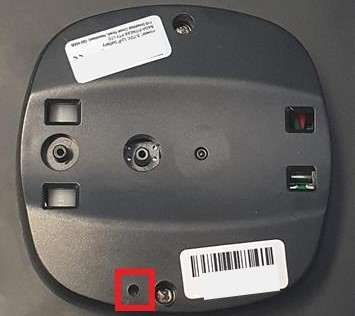
- Turn the SAGA module back on and attempt to pair it with your device.
Still not working?
Contact us at support@saga.fitness with a short video of the issue, your order number, and whether it's one or both cuffs that is affected. Our team will take it from there.