
The sensor inside your cuffs that detects limb occlusion pressure (LOP) is sensitive and may occasionally require a reset to function correctly. Please note this is steps for AirBands 2.0 cuffs, if you have AirBands V1 cuffs please read this Article - How do I hard reset my AirBands V1?
- Turn the cuff on and confirm it's powered on; you should see a flashing blue light if so.
- Turn the module over and locate the small reset hole directly beside the serial number. Do not fully remove the module. If needed, gently roll the air bladder to access it.
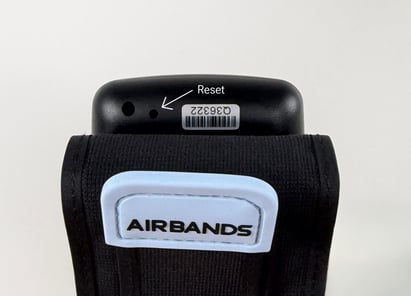
- With the module powered on, insert a paperclip or straw cleaner into the reset hole and press until you hear a click. Continue holding until the light turns off, then hold for a further 5 seconds.
- Release and the light should come back on.
- Completely close the app and reopen it. Then reconnect your cuffs.
Still not working?
Contact us at support@saga.fitness with a short video of the issue, your order number, and whether it's one or both cuffs that is affected. Our team will take it from there.